
Building Jira →TrustWorks Automations
A Reusable Pattern for Workflow Automation
1. Purpose of this guide
This guide describes the recommended pattern for integrating Jira workflows with TrustWorks. It focuses on concepts, architecture and best practices, not fixed rules or customer specific configuration. The goal is to give you a reusable integration approach that other teams can adapt to their own workflows.
This pattern is relevant for use cases such as:
- Vendor risk management
- Procure to Pay
- DPIAs
- Procurement or Legal reviews
- Access reviews and onboarding
You do not need to replicate the exact workflows shown in this guide. The focus is on showing how Jira and TrustWorks can work together as part of an automated privacy or security process.
2. Architecture Overview
Jira is the workflow engine
Jira remains the system of origin for vendor or procurement actions. Jira triggers the workflow and drives the internal process.
TrustWorks is the execution layer
Once triggered, TrustWorks performs the privacy or security action:
- Creating or associating legal entities or assets
- Launching assessments or questionnaires
Optional return workflow
After TrustWorks completes its part, it can optionally push status updates back into Jira. This closes the loop with no manual intervention.
3. Why Jira is used as the trigger
In most organisations, Jira already acts as the workflow engine for procurement, legal or privacy reviews. Using Jira Automation rules avoids any changes to your existing process. You simply extend the workflow to activate TrustWorks when needed.
This integration design allows customers to:
- Avoid duplicating vendor workflows in multiple systems
- Keep all approvals and SLAs inside Jira
- Let TrustWorks focus on the assessment and data governance
4. Core Integration Pattern
Step 1. Jira evaluates workflow conditions
A Jira automation rule checks the ticket fields or status. When a specific condition is met (for example: vendor review needed), the rule triggers the next step.
Step 2. Jira calls TrustWorks using our API endpoints
The automation rule sends a HTTPs request to TrustWorks (here’s a full list of our API endpoints: https://api.trustworks.io/redoc). The rule typically includes information such as:
- Vendor or supplier name
- Asset or product name
- Owner or requester details
Jira remains the source of truth and the single place where users take action.
Step 3. TrustWorks processes the request
TrustWorks receives the request and performs the appropriate action. For example:
- Checking whether a vendor already exists
- Creating or linking an asset
- Triggering an assessment workflow
Step 4. (Optional) TrustWorks pushes an update back to Jira
TrustWorks can call a Jira webhook to update the status of the Jira ticket. This closes the workflow without manual data entry.
5. Example: Jira Automation Structure
Here is an example structure of a Jira automation rule. This is shown for illustration, not as a fixed rule to copy:
-
Rule begins when the Jira item transitions to a specific status
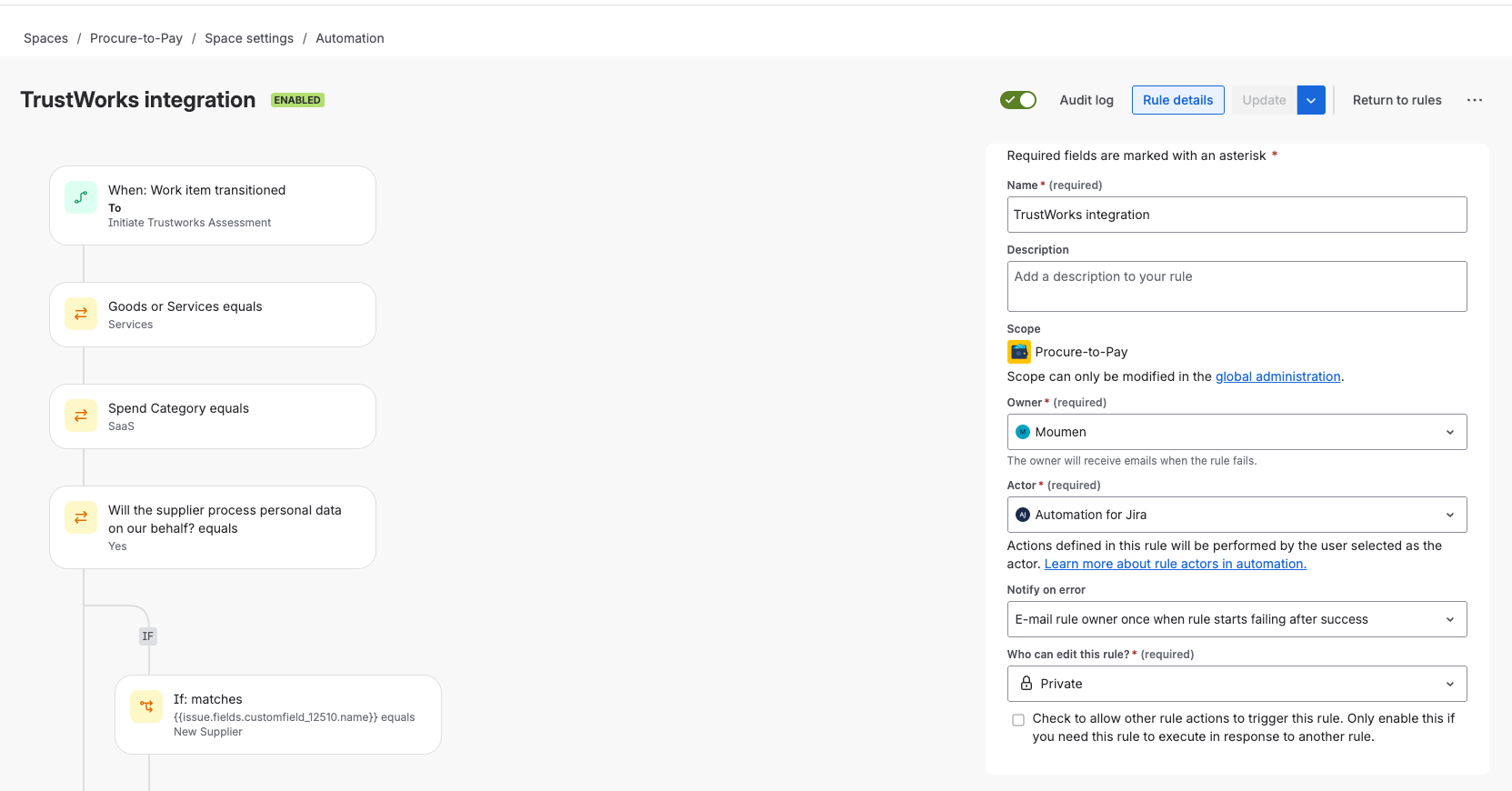
Example Jira trigger
- Optional filters apply (spend category, etc)
-
Jira sends HTTP requests to TrustWorks
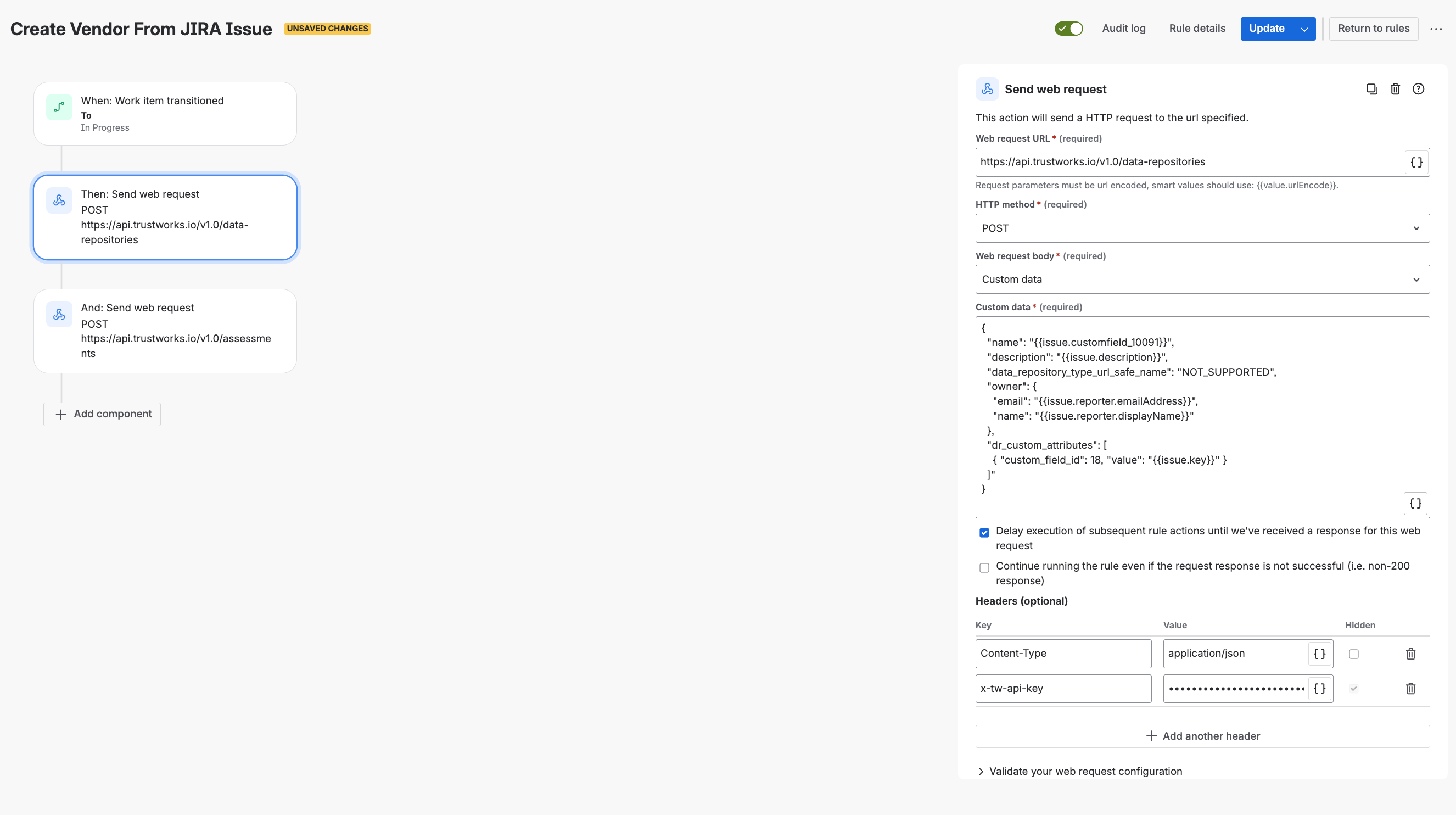
Example request to TrustWorks to create an Asset
- TrustWorks performs the requested actions
-
Optional return path updates the Jira ticket
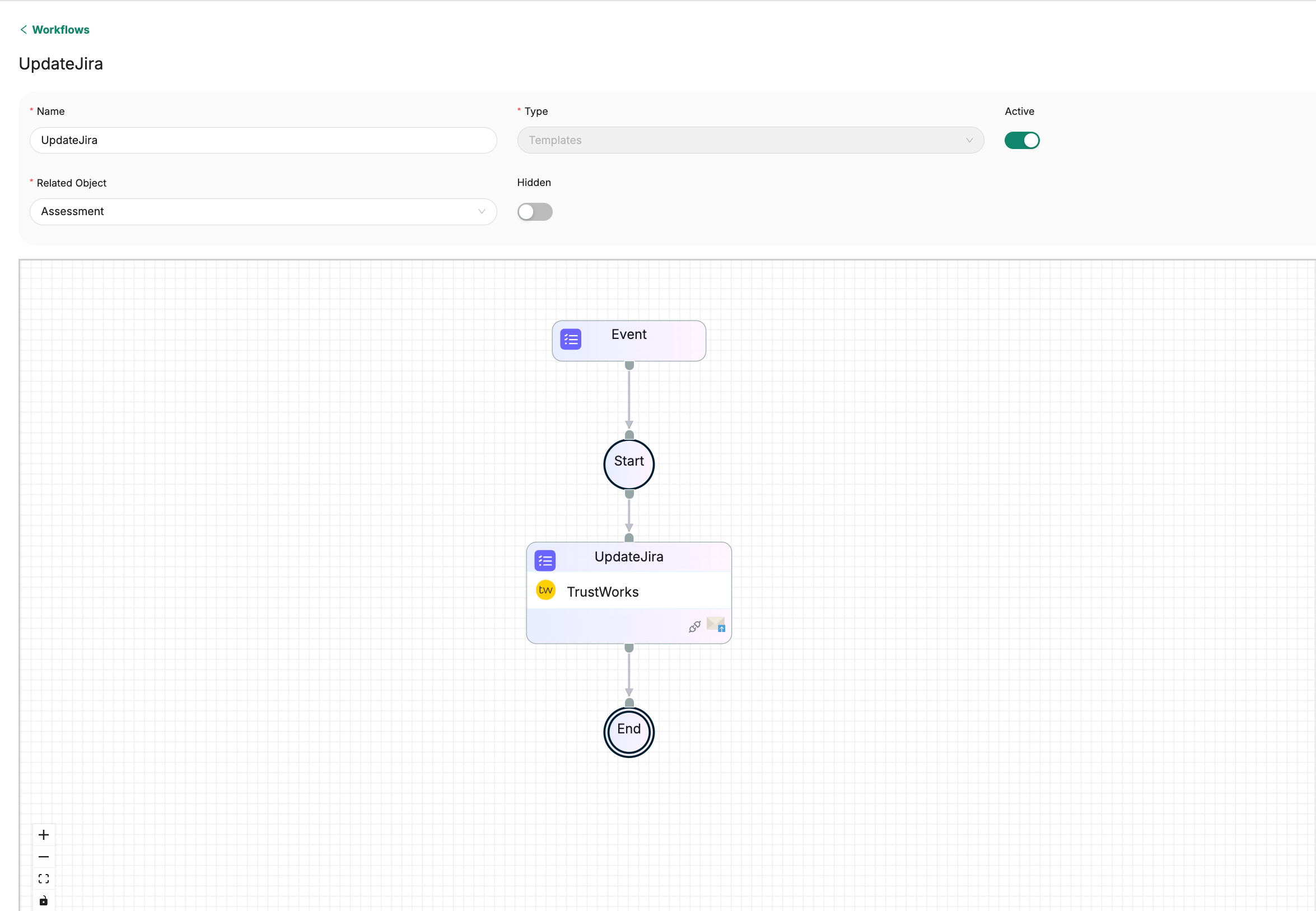
Workflow in TrustWorks that updates Jira using a Jira incoming webhook
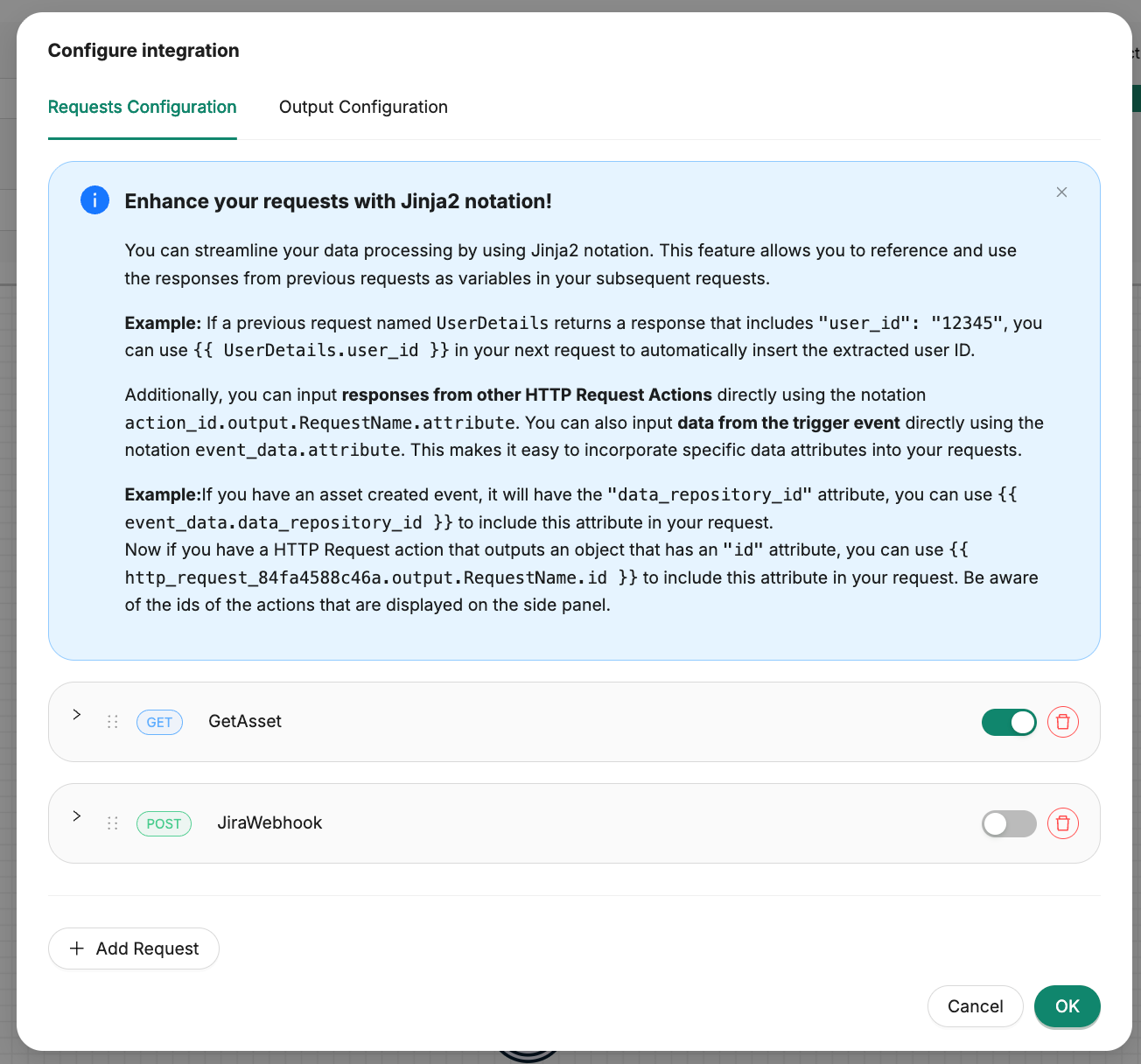
Request configuration inside the UpdateJira HTTP action
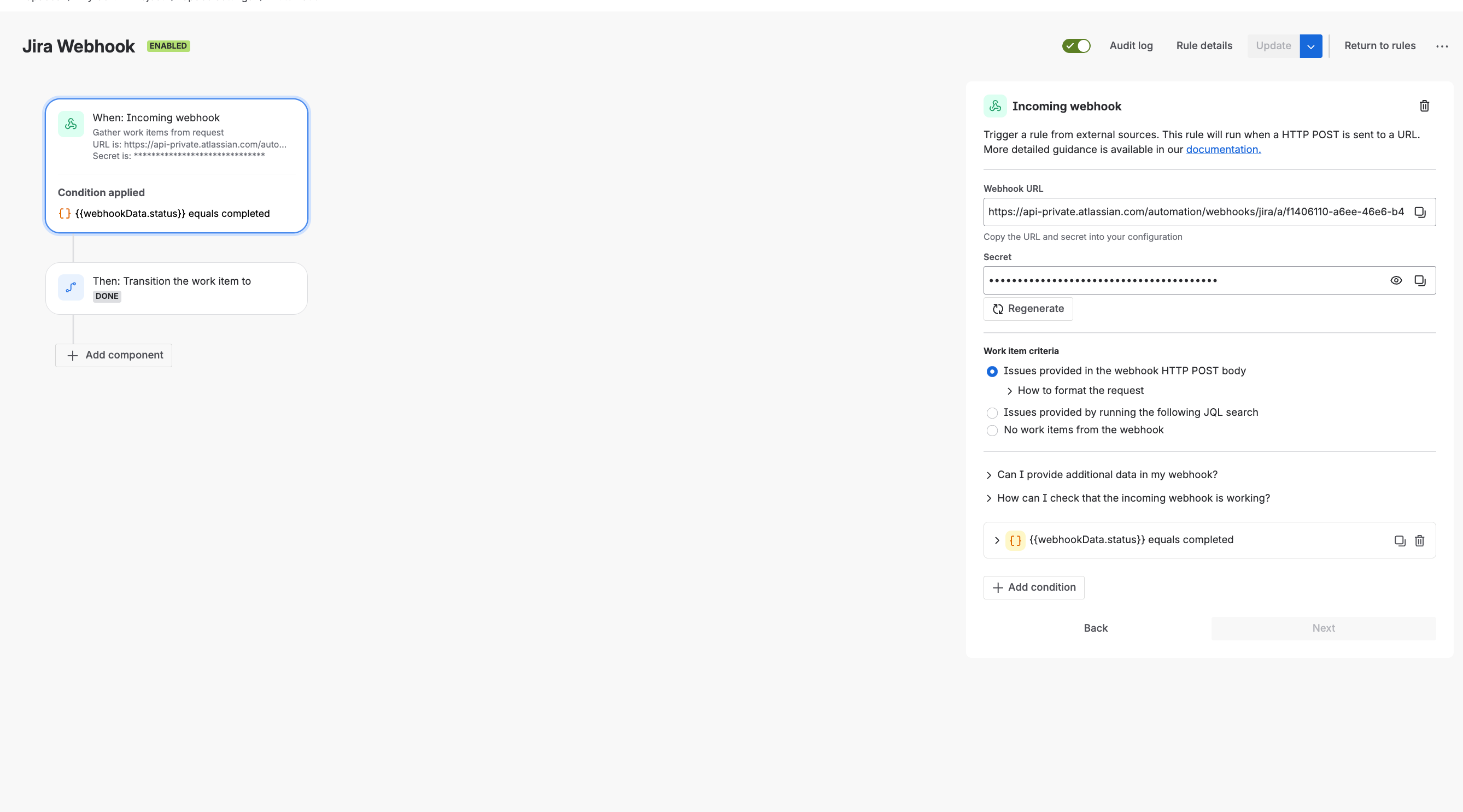
Jira rule that listens for any request sent to the incoming webhook
Important : any organisation can adapt the conditions, mapping logic and workflow to fit its internal process.
6. Design Principles
When building workflows using this pattern, we recommend:
Keep Jira in control of the workflow
Jira triggers the integration and drives the process. This avoids parallel approval workflows or duplicated logic.
Send only the required information
TrustWorks should receive only the data needed to perform its task. This reduces complexity.
Avoid duplication
Before creating records in TrustWorks, check whether they already exist. The integration pattern supports this.
Close the loop cleanly
If the process requires Jira updates (such as marking a review complete), use an incoming Jira webhook. This keeps everything synchronized.
7. Example Screenshots
Below are example screenshot layouts to illustrate how this pattern looks when implemented:


This example workflow shows how Jira can automatically drive the full lifecycle in TrustWorks. When a ticket reaches a specific status, the automation first checks whether the supplier already exists in TrustWorks. If it does, the product/asset is linked to the existing supplier; if not, both the legal entity and asset are created. The workflow then triggers the appropriate assessment in TrustWorks. Once the assessment is completed, TrustWorks sends a webhook back to Jira, which updates the issue status. The entire loop runs end to end without manual intervention.
This shown only to demonstrate the architecture, not as strict configuration instructions. Other customers use the same pattern but with different triggers, conditions and mappings.
8. Best Practices
- Keep conditions in Jira simple and declarative
- Use Jira fields as the source for vendor or asset names
- Test the integration using sandbox or staging workflows first
9. Summary
This integration pattern allows you to keep Jira workflows intact while adding automated privacy and compliance actions in TrustWorks. It removes manual steps, eliminates double entry and keeps procurement, legal and privacy teams aligned.
By separating workflows and execution, organisations can build scalable automation around their risk reviews and assessments.