
Processing Activities (RoPA)
The Processing Activities module in TrustWorks enables organisations to manage and document their data processing activities effectively. It serves as a central repository for recording essential details about various processing activities performed within the organisation.
Overview of Processing Activities
Maintaining a comprehensive record of processing activities (RoPA) is a key requirement under the General Data Protection Regulation (GDPR). Article 30 of the GDPR mandates that data controllers and data processors must maintain an overview of all data processing activities. This includes information about the purpose of processing, categories of personal data processed, categories of data subjects, any data transfers to third countries or international organisations, retention periods, and descriptions of security measures.
TrustWorks Processing Activities module streamlines the process of creating, managing, and documenting processing activities, ensuring organisations achieve GDPR compliance and enhance data governance.
Viewing Existing Processing Activities
To access the list of existing processing activities in TrustWorks, follow these steps:
- Navigate to the Processing Activities section.
- Here, you'll find a comprehensive list of processing activities, each with specific details.

For each processing activity, the following information is available:
General Details
-
Processing Activity Name
The name used to identify the processing activity.
-
Status
The current lifecycle stage of the activity (e.g. Draft, In Review, Approved).
-
Type
Indicates whether the organisation acts as a Controller or Processor.
-
Primary Controller
The legal entity acting as the main controller for the processing activity.
-
Joint Controllers
Any additional legal entities that jointly determine the purposes and means of processing.
-
Team
The internal team responsible for the processing activity.
-
Business Function
The business function associated with the activity, where applicable.
-
Owner
The individual responsible for maintaining and overseeing the processing activity.
-
Purpose of Processing
A description of why personal data is processed.
-
Description
Additional context or explanation related to the processing activity.
Data Mapping
The Data Mapping section provides a complete overview of how personal data flows through the organisation for this processing activity.
-
Categories of Individuals
The types of data subjects whose personal data is processed (e.g. employees, customers).
-
Data Categories
The categories of personal data involved in the processing (e.g. identification, employment, health data).
-
Data Sources
The origin of the personal data (e.g. data subjects, internal systems).
-
Data Storage and Processing
The systems, applications, or repositories where personal data is stored or processed.
-
Data Sharing
Internal or external recipients with whom personal data is shared, including geographic scope where applicable.
Data Policies
The Data Policies section defines the legal and compliance rules governing the processing activity.
-
Lawful Basis
The legal justification for processing personal data (e.g. legal obligation, contractual necessity, legitimate interest).
-
Retention Schedules
The defined period for which personal data is retained before deletion or anonymisation.
Additional Sections
-
Processors and Sub-processors
Third parties involved in processing personal data on behalf of the organisation.
-
Risks Management
Identified privacy risks and mitigation measures.
-
Assessments
Linked assessments such as DPIAs.
-
Additional Information
Organiation-specific custom fields.
-
Reference Documents
Supporting documentation related to the processing activity.
-
Comments
Internal collaboration notes and discussion history.
Creating New Processing Activities
To create a new processing activity manually, follow these steps:
Step 1: Start a New Processing Activity
- Navigate to Processing Activities.
- Click + New Processing Activity.
Step 2: Provide General Details
- Fill in the core information for the processing activity:
-
Processing Activity Name
Enter a clear and descriptive name for the activity.
-
Status
Select the current status of the activity (e.g. Draft).
-
Type
Choose whether the organisation acts as a Controller or Processor.
-
Primary Controller
Select the legal entity acting as the main controller.
-
Joint Controllers
Optionally select additional entities that jointly determine the processing.
-
Team
Assign the internal team responsible for the activity.
-
Business Function
Associate the activity with a business function, if applicable.
-
Owner
Assign a user responsible for maintaining the record.
-
Purpose of Processing
Describe why personal data is processed.
-
Description
Add any additional context or clarifications.
Step 3: Complete Data Mapping
- Use the Data Mapping tab to document how personal data flows through the organisation.
-
Categories of Individuals
Select the types of data subjects involved (e.g. employees, customers).
-
Data Categories
Specify the categories of personal data being processed.
-
Data Sources
Define where the data originates from (e.g. data subjects, internal systems).
-
Data Storage and Processing
Select the systems or repositories where data is stored or processed.
-
Data Sharing
Identify internal or external recipients of the data.
Step 4: Define Data Policies
- Navigate to the Data Policies tab to set compliance-related rules:
-
Lawful Basis
Select the legal basis for processing personal data.
-
Retention Schedules
Define how long personal data is retained before deletion or anonymisation.
Step 5: Create the Processing Activity
- Review the information entered.
- Click Create to save the processing activity.

Managing Existing Processing Activities
TrustWorks provides various actions for managing existing processing activities:
- Update the status (draft, in review or approved). This way it's easier to keep track of the progress.
- Update the team/owner of the processing activity.

- Update the data mapping
- Add data sources and data sharing
- Update the lawful basis (you can also use the assistant for that)

- Duplicate data mapping and make adjustments if necessary

- Add retention schedules
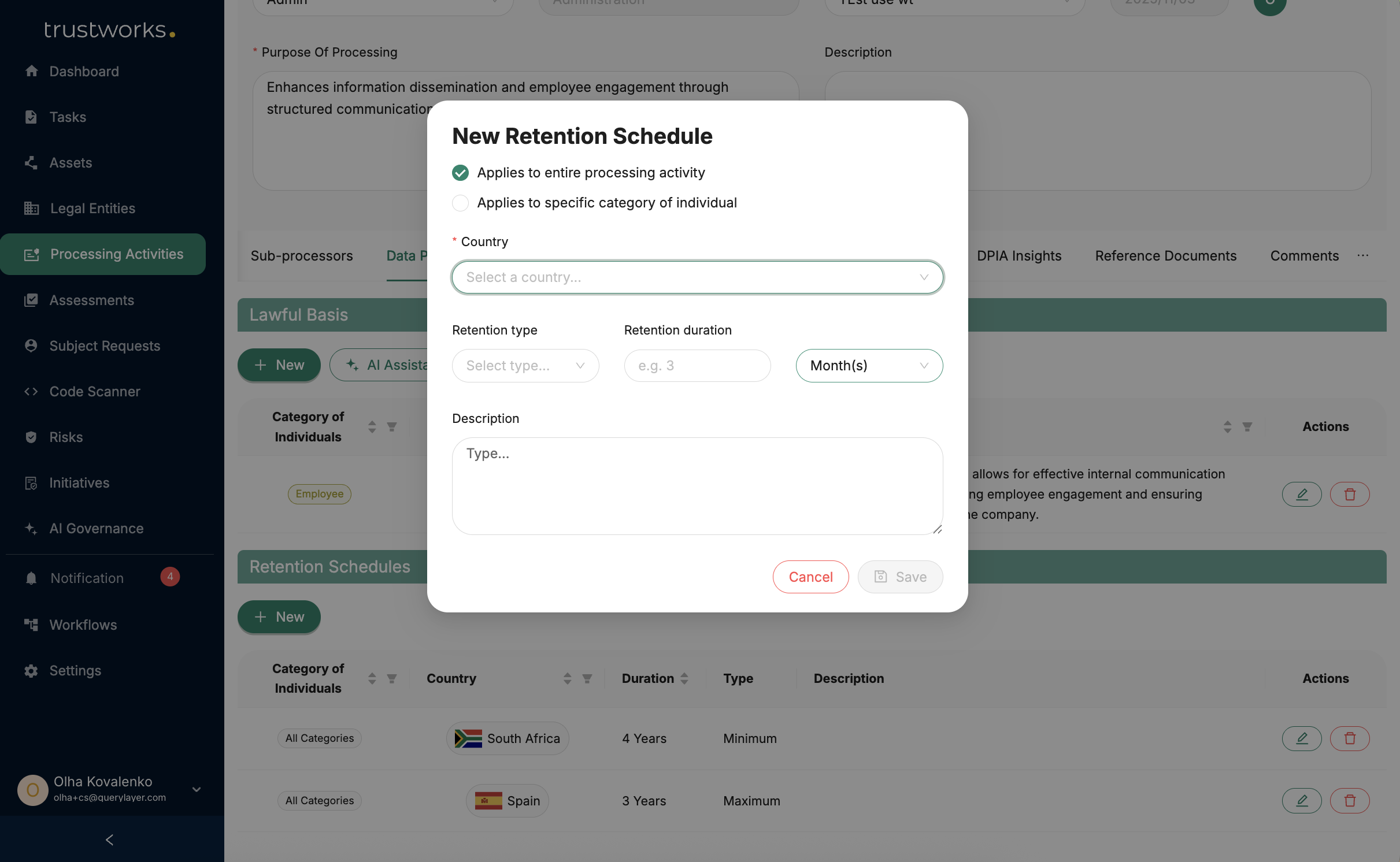
It's essential to keep the information in the processing activities up-to-date and accurate to ensure compliance with data protection regulations.
Using AI-Assistant for Automated Processing Activities Creation and Enrichment
TrustWorks' AI-assistant feature streamlines the process of creating processing activities by utilising the data map for context. This innovative capability saves time and reduces manual data entry efforts, making the creation of processing activities more efficient and accurate.

You can also enhance the data mapping with suggestions of Assets, Category of Individuals, and Data Categories using the Ai-assistant.

Exporting RoPA
The Record of Processing Activities (RoPA) can be exported from TrustWorks to support regulatory and compliance requirements. Exported data can be further edited or updated externally if needed.
You can export:
- All records or only the current (filtered) view
- Controller RoPA, Processor RoPA, or a combined export
- RoPA data for a specific entity


Conclusion
TrustWorks Processing Activities module provides organizations with a robust platform to manage and document data processing activities effectively. By maintaining a comprehensive overview of processing activities, organizations can achieve GDPR compliance, enhance data governance, and demonstrate their commitment to data protection.
Efficiently manage processing activities, approve, edit, or delete existing records, and leverage the AI-assistant feature for automated processing activity creation. With TrustWorks, organisations can ensure robust data privacy management and regulatory compliance.